What Is a CRM?
A customer sends a message, asks about the price, and calls a week later to place an order. Another employee answers. They have not seen the conversation and know nothing about the previous arrangements, so everything has to be explained again. For the customer, this means unnecessary questions. For the business, it creates the risk of losing the order. A CRM helps preserve the history of communication and purchases so that working with a customer does not depend on one person’s memory. A CRM system is software that collects and organizes customer information, stores the history of interactions, and helps manage sales, service, and marketing. In everyday conversation, CRM usually refers to the software itself. But installing it and organizing customer work are not the same thing. First, you need to define the problems you want to solve.
What Does CRM Mean, and What Is Its Purpose?
CRM stands for Customer Relationship Management. The purpose of a CRM is to retain useful information about a customer and use it during the next interaction. What did they order? What offer did they receive? At what stage did the deal stop? When did they last contact or visit you?
Put simply, a CRM is a company’s shared working memory about its customers. Employees work with a single database and can continue from where a colleague left off. A CRM is not just a list of phone numbers. A contact on its own says very little. It is much more useful to see the person’s order history, inquiries, agreements, and next steps alongside it.
What Does a CRM System Look Like in Practice?
Imagine a customer profile. It can contain:
- name and contact details;
- the source of the inquiry, such as a website or advertising campaign;
- messages, calls, and employee notes;
- leads, deals, orders, and their statuses;
- purchase and payment history;
- tasks assigned to the responsible employee;
- information about participation in a loyalty program.
How Does a CRM System Work?
The operating principle can be described as a sequence of actions: the system receives customer information, links it to the customer’s profile, helps perform the required action, and stores the result.
1. It receives data. An employee enters it manually, or it arrives from connected services such as website forms, a POS system, telephony, or an online store. A CRM does not learn about a purchase on its own; it needs a source of information.
2. It stores the history. An inquiry, order, or message is linked to the customer. When the person contacts the company again, the employee sees previous interactions and does not have to start the conversation from scratch.
3. It helps the team act. Depending on the CRM’s capabilities, you can assign a responsible employee, create a task, move a deal to the next stage, or trigger a message when a specified condition is met.
4. It collects results. A manager receives reports showing how many inquiries became orders, where deals are being delayed, and how often customers return. The available metrics depend on the data entering the system. Suppose a customer requests a price estimate. The CRM creates a record and a task for the manager. The manager sends an offer, records the result, and schedules the next contact date. If the customer agrees, the deal moves to order processing. The scenario is different in retail: the system receives purchase information, updates the customer’s history, and, when connected to a loyalty program, can account for rewards and participation terms.

What Is a CRM for Sales?
A sales CRM is a system that helps guide a potential customer from the first inquiry to the deal: tracking leads, assigning responsible employees, controlling stages, and planning next steps. This type of CRM usually uses a sales pipeline. For example: “New inquiry,” “Clarifying requirements,” “Offer sent,” “Awaiting payment,” and “Deal completed.” The stages should reflect how the company actually works. Why does a sales manager need this? To see who needs a call today, who is waiting for an estimate, and who should be contacted again. A team leader needs it to understand how many deals are currently in progress and where delays occur. Sales CRM systems are especially useful when a purchase decision takes time, such as in services, wholesale, or real estate. A store where customers pay at the checkout may have different priorities: purchase history, segmentation, and repeat sales.
Why Does a Business Need a CRM?
The main purpose of a CRM is to organize customer work so that inquiries, agreements, and purchase history remain available to the entire team. In practice, this provides several benefits.
Fewer lost inquiries. Each inquiry has a responsible employee, and the employee has a clear next step. This helps the team respond on time and return to unfinished conversations.
More consistent service. Customers do not have to explain everything from the beginning every time. Even if the manager changes, the history stays with the company.
Less manual routine. Integrations and automated scenarios reduce repeated data entry, list preparation, and the sending of repetitive messages.
Offers based on customer interests. Purchase history can be used to create groups and prepare different messages. For example, a business can work separately with new customers and those who have not returned for a long time.
Clearer results. Instead of a general feeling that “sales are going well,” you get metrics that can be compared and analyzed. A CRM helps increase revenue when the team processes inquiries faster, brings more deals to payment, or receives repeat orders. Savings come from reducing manual work and allocating marketing spending more precisely. However, a subscription to a service does not guarantee profit growth by itself. You need up-to-date data, clear working rules, and offers that customers genuinely find valuable.

What Does Working in a CRM Mean for an Employee?
Working with a CRM means performing daily actions with customer data: finding a profile, recording the outcome of a conversation, updating an order status, creating a task, or selecting an audience for a message. A sales manager works mainly with deals. An administrator works with customers and purchases. A marketer works with segments, campaigns, and results. Access rights can be distributed according to responsibilities if the system supports this configuration. Employees should understand what data needs to be entered and why. If every call requires filling in dozens of unnecessary fields, people will start postponing record updates. The reports will then quickly lose accuracy.
CRM and ERP: What Are They, and What Is the Difference?
A CRM focuses on customer relationships: inquiries, sales, service, and marketing.
ERP stands for Enterprise Resource Planning. It helps manage internal processes such as procurement, inventory, production, finance, and other operations. For example, a CRM shows that a customer has approved an order and is waiting for delivery. An ERP can help check product availability, plan procurement, and account for the costs of fulfilling the order. The boundaries are not always clear. An ERP can include a CRM module, while a CRM can include certain accounting functions. It is therefore better to choose a system based on its tasks and capabilities, not only its name.
Which CRM Should a Company Choose?
Start with what is currently getting in the way. Are inquiries being lost between messaging apps? Do managers forget about the next call? Are customers not returning while you do not know whom to send an offer to? When choosing a CRM, check:
- Purpose. Is the system suitable for your sales process or for working with regular customers?
- Integrations. Can it receive data from the services you already use?
- Usability. Is it easy to complete a routine task, such as finding an order, updating a status, or selecting a segment?
- Reports. Do they let you evaluate the result for which you are implementing the CRM?
- Cost. How much will the required plan, setup, additional modules, and communications cost?
How Does Loyallyst CRM Help You Work With Customers?
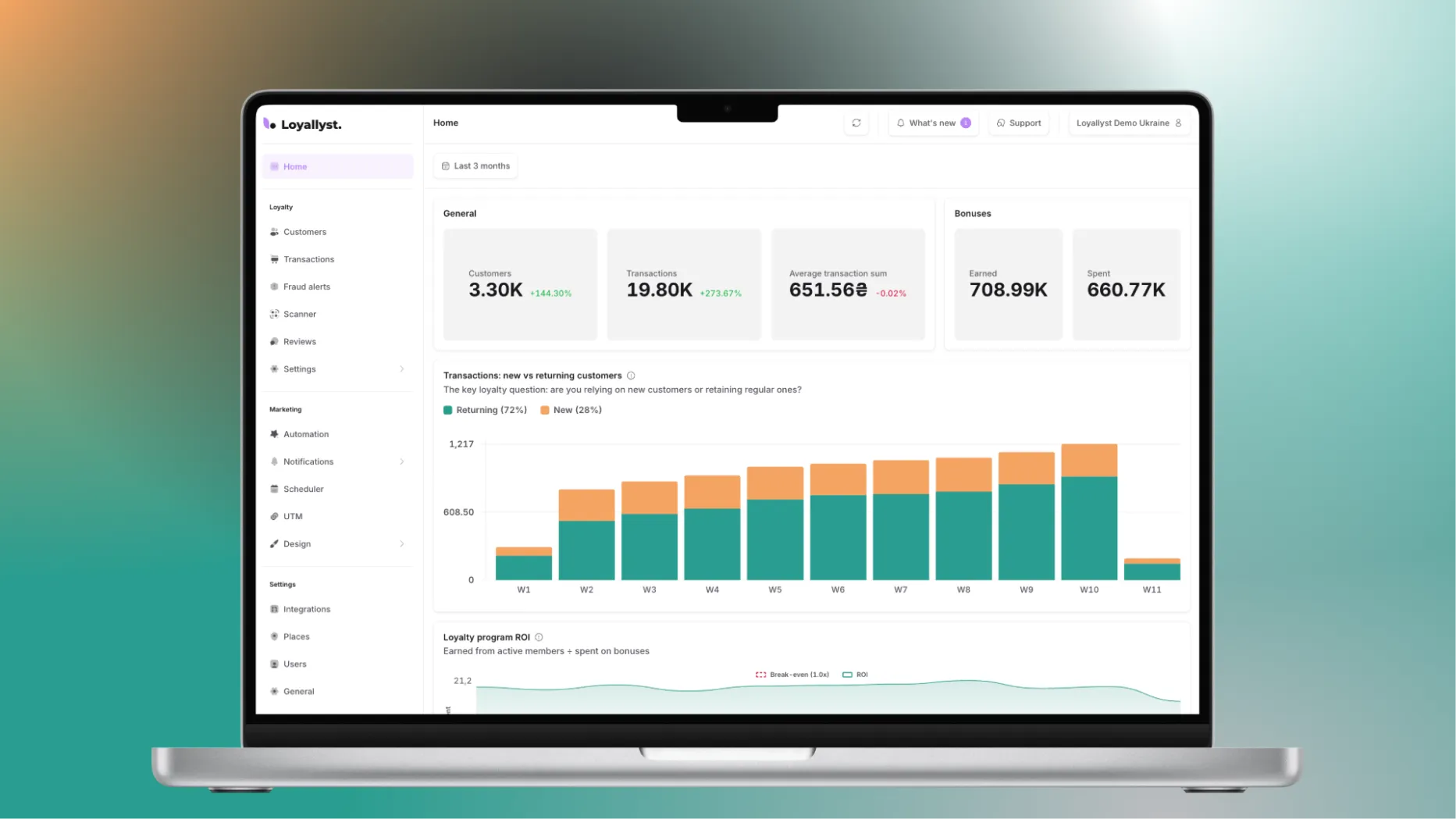
Loyallyst CRM is designed for working with loyalty program members. The platform combines a customer database, segmentation, messaging, and analytics; available integrations and automated scenarios depend on the selected plan.
In this model, the CRM helps determine whom to offer a benefit to and when, while the loyalty program defines the reward itself: points, a discount, a gift, or special terms.
If you are still choosing the mechanics, read our article, “What Is a Loyalty Program?” It will then be easier to connect reward rules with customer retention objectives.
Want to connect Loyallyst CRM? Submit a request and tell us how you currently track customers and purchases. We will discuss the required capabilities and connection method so that you can start with a specific task, such as building a single database or working with customers who have not returned for a long time.



Frequently Asked Questions
A CRM is a company’s shared working database where customer details, inquiries, purchases, and communication history are stored.
A CRM receives data manually or from connected services, links it to a customer profile, helps the team take the next action, and stores the result.
A CRM helps prevent lost inquiries, preserve interaction history, reduce manual work, prepare personalized offers, and analyze results.
A CRM focuses on customers, sales, service, and marketing. An ERP helps manage internal resources and processes such as procurement, inventory, production, and finance.
Start with the problems you need to solve, then evaluate the system’s purpose, integrations, usability, reports, and total implementation cost.