
How to Launch a Loyalty Program with Loyallyst: A Step-by-Step Guide
A loyalty program allows businesses to increase repeat purchases and build long-term relationships with customers.
With Loyallyst, you can launch a convenient system of bonuses, discounts, tiers, digital Apple/Google Wallet cards, and push notifications in just a few days.
Why a Loyalty Program Is a Must-Have Tool for Any Business?
A properly configured loyalty program helps you:
- increase the number of repeat visits
- raise the average check
- reduce advertising costs
- collect customer behavior data
- increase customer lifetime value (LTV)
- retain existing customers
- reduce churn and predict audience behavior
Read more in our article 👉 What is a loyalty program?
What Loyallyst Can Do?
Loyallyst is a full-featured digital loyalty ecosystem. You can launch:
✔ Bonus program (cashback) ✔ Discounts ✔ Loyalty tiers (Silver / Gold / Platinum) ✔ “8th coffee free” reward promotion ✔ Coupons ✔ Apple Wallet & Google Wallet digital cards ✔ Push notifications without an app ✔ QR-based customer registration ✔ Sales and customer analytics ✔ Review module ✔ Online menu
Step-by-Step: How to Launch a Loyalty Program with Loyallyst
Below is the complete process we use when onboarding clients in Ukraine, Moldova, Kazakhstan, Poland, Spain, and other countries.

Step 1 — Connecting Your POS System or the Loyallyst Scanner
Why POS Integration Is Important for Accurate Loyalty Processing?
Integration with a POS system is the most reliable and accurate way to manage loyalty. When the POS is connected to the platform, it automatically transfers all data about orders, customers, amounts, and accruals. Thanks to this, the system:
- fetch the customer card by phone number or QR code
- automatically award and redeem bonuses
- apply discounts, tiers, and promotions
- record the purchase immediately after the check is closed
- synchronize order history and balances across all locations
At the same time, Loyallyst pulls all bonuses, tiers, and customer history, even if the customer was already in your database. No manual actions from the cashier — everything happens automatically and without errors.
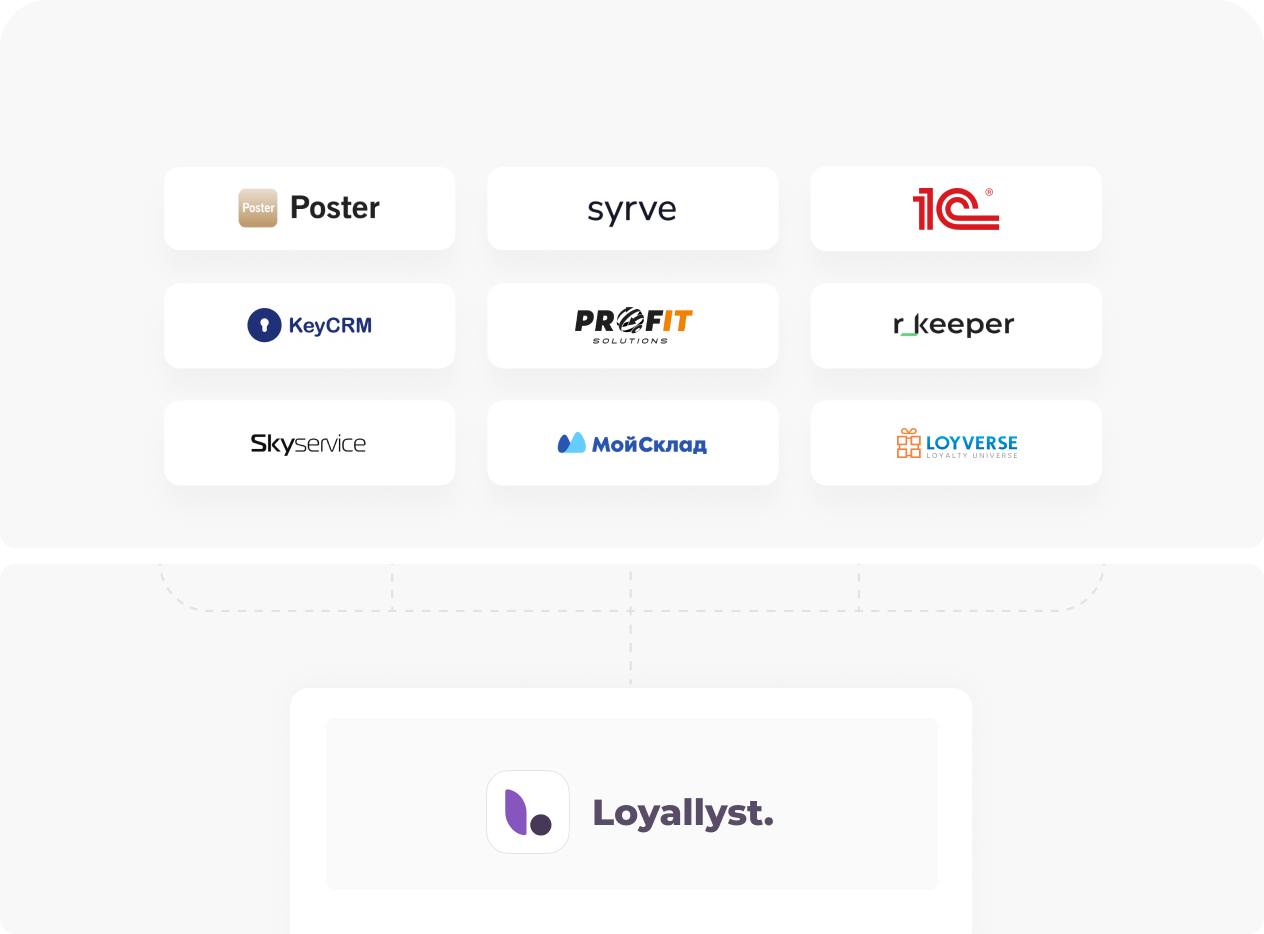
Loyallyst integrates with leading POS systems:
- Poster
- Syrve
- iiko
- R_Keeper
- SkyService
- Loyverse
- KeyCRM
- BAS / 1C
- ProfIT
- FoodSoft
- and more
After Connecting Your POS:
- the POS automatically accrues and redeems bonuses
- the cashier sees the customer card, balance, and tier
- all order history is synchronized
- bonuses, discounts, and promotions are applied automatically
- employee errors are eliminated
If You Don’t Have a POS or It Doesn’t Support an API: Loyallyst Scanner Is the Solution
If you are not using modern POS systems, we have created Loyallyst Scanner for such cases. It is a web-based tool that works in a browser and does not require integration with a POS system.
With it, you can:- find customers by QR code or phone number;
- view their balance;
- check their purchase history and loyalty tiers;
- manually add or deduct bonuses.
All information is automatically synchronized with the Loyallyst system. As a result, you can launch a loyalty program even if you are still using legacy accounting software or operating without any POS integrations at all.
Step 2 — Configuring Loyalty Mechanics in the Admin Panel
After connecting your POS system or Loyallyst Scanner, the next step is to configure your loyalty rules in the admin panel. Here you define:
- which bonuses will be начисed;
- which tiers will be available to users;
- how promotions and reward mechanics will work.
- birthday greetings;
- morning offers;
- promotions for new users;
- special conditions for specific segments;
- personalized recommendations after a purchase.
Step 3 — Creating a Digital Loyalty Card for Apple Wallet and Google Wallet
Now that your loyalty mechanics are set up, it’s time to create a digital card. In the Loyallyst system, this process is quite simple. You choose your brand colors, logo, and banner. The system then automatically generates a ready-to-use digital card with the balance, loyalty tier, a unique QR code, and user information. The card can be added to Apple Wallet or Google Wallet, and after each new receipt it updates automatically, making it a full replacement for traditional plastic loyalty cards.
Below is an example of how the card setup interface looks and how the card is displayed on a smartphone: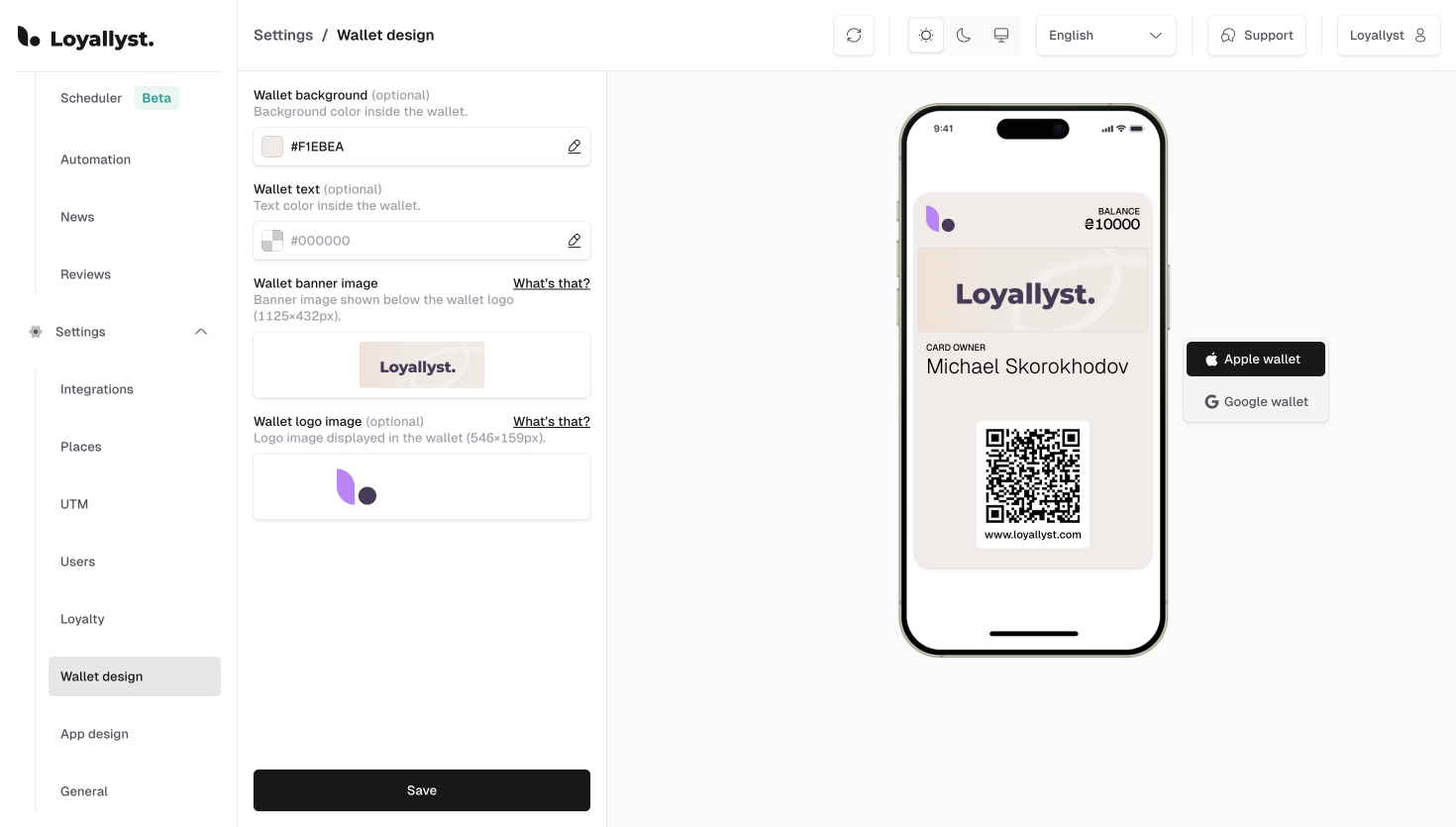
To ensure the card displays correctly and looks professional, it’s important to use the proper image sizes:
Wallet logo image — the logo in the top-left corner
Size: 546 × 159 px This is a small horizontal image shown at the top of the card on the left, next to the brand name. Usually, a minimalistic logo or brand mark is uploaded here.
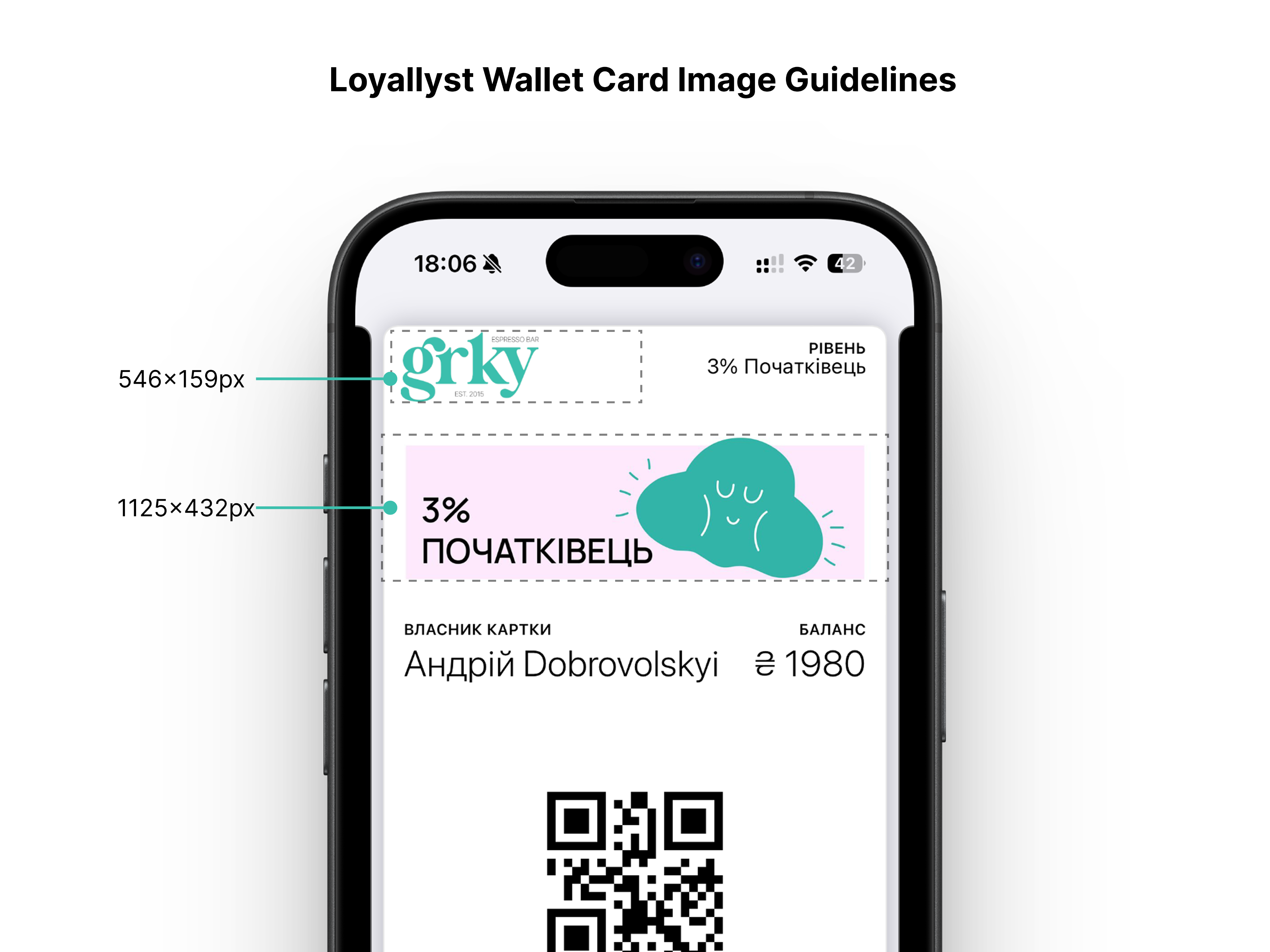
Wallet banner image — the large image in the center of the card
Size: 1125 × 432 px This is a large banner placed under the logo. It takes up the main visual area of the card and sets the overall style. You can use it as a branded background, a promo banner, or simply a clean visual in your brand colors.
Both images must be uploaded in PNG or JPEG format, up to 2 MB in size.Step 4 — Launching Customer Registration
Once the card is ready, you can start customer registration. The simplest approach is to place QR codes at the counter, on tables, packaging, or the storefront: the customer scans the code, fills out the form, and instantly receives the card in Apple Wallet or Google Wallet.
If you already have an existing customer base, we transfer it into the system so customers immediately gain access to their digital card. Registration can also be launched through your website or social media — the customer opens the link and gets their card in one click.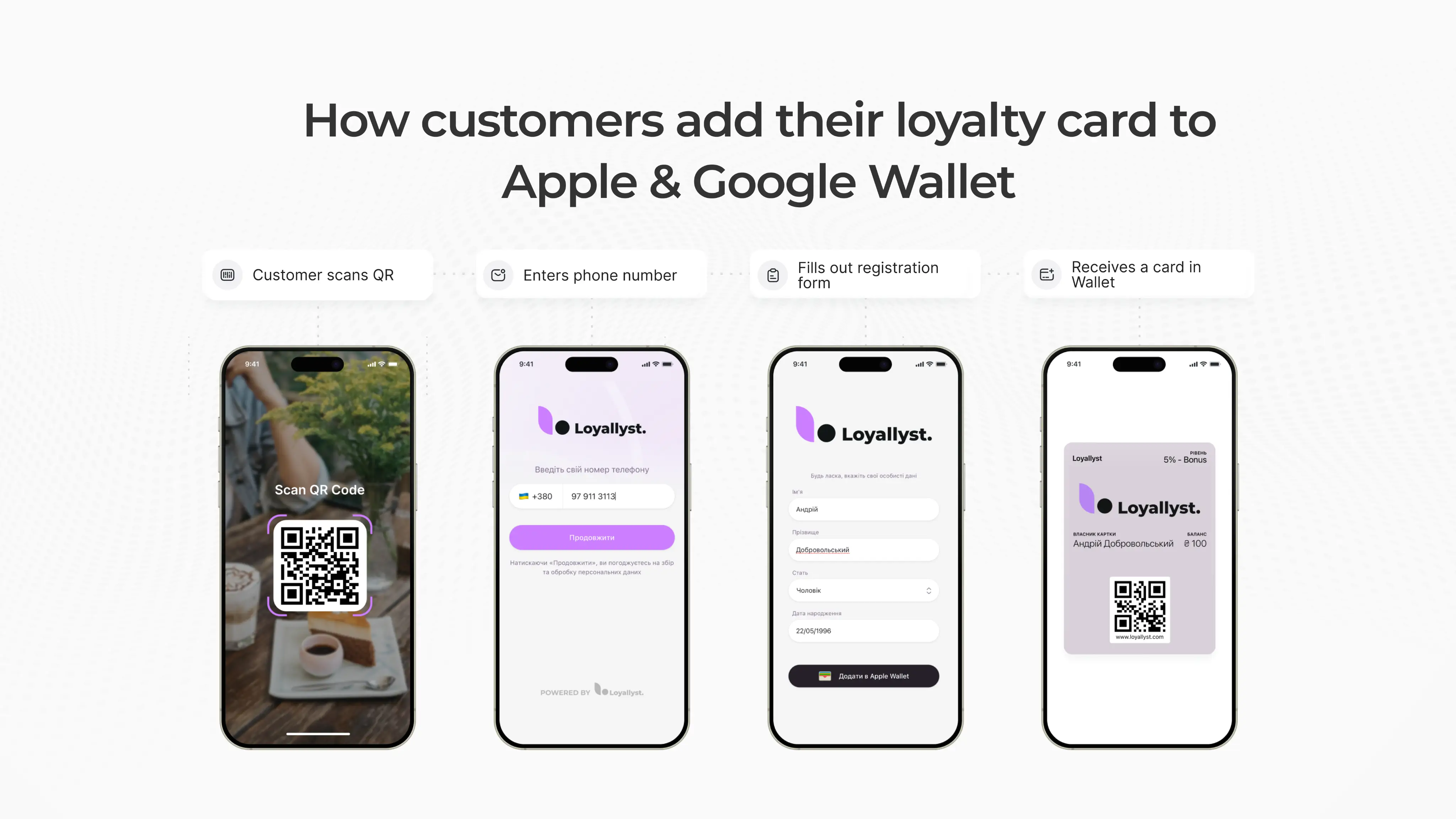
Step 5 — Automating Push Notifications (free and without an app)
Push notifications are delivered directly through Apple Wallet and Google Wallet — the customer receives a message on their phone screen even without having an app installed and without any cost to the business. You can configure automated triggers: birthday greetings, reminders for customers who haven’t visited in a while, alerts that bonuses are about to expire, tier upgrades, or personalized offers. After a purchase, you can automatically request a rating and review. Such push notifications significantly increase repeat visits — on average, the growth ranges from 18% to 30%.
Step 6 — Collecting Reviews via QR
Loyallyst allows you to collect reviews immediately after a purchase: the customer scans a QR code, leaves a rating from 1 to 5, and optionally adds a comment. All ratings appear in the admin panel, where you can see service quality by day, location, and staff member. This approach helps you quickly respond to negative feedback, improve service, and increase the overall rating of your business.
Step 7 — Analytics and Customer Management
The admin panel provides detailed analytics: registration conversion, repeat purchases, average check, promotion performance, bonus balance, location statistics, customer LTV, and cohort analysis. These insights help you understand real customer behavior and make decisions based on data rather than assumptions.
Step 8 — Scaling Your Network
Loyallyst works equally well for a single location or a network with dozens or hundreds of stores. All customers are unified into one system where bonuses, tiers, and purchase history are synchronized across all cities and countries. This allows the network to grow without changing mechanics, rules, or infrastructure — the system scales automatically.
How Long Does It Take to Launch Loyallyst?
Typically:
- 1 day — integration
- 1 day — card design and loyalty mechanics setup
- 1 day — launching QR registration and push notifications
For large networks, the process may take 7–14 days due to internal approvals.
Why Brands Choose Loyallyst
- intuitive, fast admin panel
- best-in-class integrations for HoReCa and retail
- instant Wallet card issuance
- free push notifications
- flexible automation
- powerful analytics
- support and onboarding assistance
- works across multiple countries
Let’s talk
Leave your contact details, and we’ll get in touch shortly.


Frequently Asked Questions
Typically, the launch takes 1–3 days: POS integration, card design, push automation, and QR customer registration.
No. Loyallyst works both with POS integrations and through a web scanner that lets you manually credit and redeem bonuses.
Bonuses, discounts, tiers, coupons, gift mechanics, every 8th coffee free, push notifications, Wallet cards, and QR registration.
Yes, Loyallyst automatically generates digital cards that can be added to Apple/Google Wallet in one click.